Quick answer: When a Mercury outboard's trim and tilt won't move, note what you observe without forcing anything: no sound at all, a click, a motor hum without movement, slow drift, or a visible wet spot or sheen. Check the visible battery switch position and look for physical obstructions or signs of damage, then submit your observations and serial number at hbwservice.ca.
You're at the dock or the ramp, thumb on the trim switch, and the motor stays put. The fastest way to keep a small issue from turning into a bigger repair is to record what you actually observe instead of guessing at parts or forcing the outboard.
Quick Dockside Observations (Engine Off, Hands Clear)
Keep the engine off, stay in a secure position, and keep hands clear of the propeller, transom bracket, and moving parts.
- Check the battery switch position. Note whether the main battery switch is on and whether you see any obvious loose or damaged wiring without touching or pulling on terminals or wires.
- Look for physical obstructions. Check whether a transom tie-down, cable, or boarding ladder is catching the bracket, or whether the tilt support lever is engaged. Do not release a support lever or lean over a moving motor.
- Look and smell for hazards first. Check around the transom bracket and trim area for any wet spot, oily sheen, visible wiring damage, or burning smell. Stop immediately if you notice any of those.
- Compare a second switch only if safe. If your outboard has both a helm trim switch and a cowl auxiliary tilt switch, and it is accessible from a secure position with no leak, burning smell, drift, or interference and nobody near moving parts, trying the second switch helps you note whether both switches behave the same way.
For battery and switch basics, see our Mercury boat battery guide.
Identifying the External Cowl Tilt Switch and Tilt Support Lever
Before you call or submit a service request, it helps to know which external hardware you are looking at. Exact switch placement and bracket layout vary across Mercury engine families, so treat the two manual figures below as model-scoped identification examples and confirm your own outboard against its serial-matched manual.
Auxiliary Cowl Tilt Switch (Example: V8 200–300 & V6 150–225 CMS DTS, 8M0230588)
On engines equipped with an external cowl switch, trying that switch (only when safe, with no leak, burning smell, or obstruction) lets you note whether both the helm switch and cowl switch behave the same way.
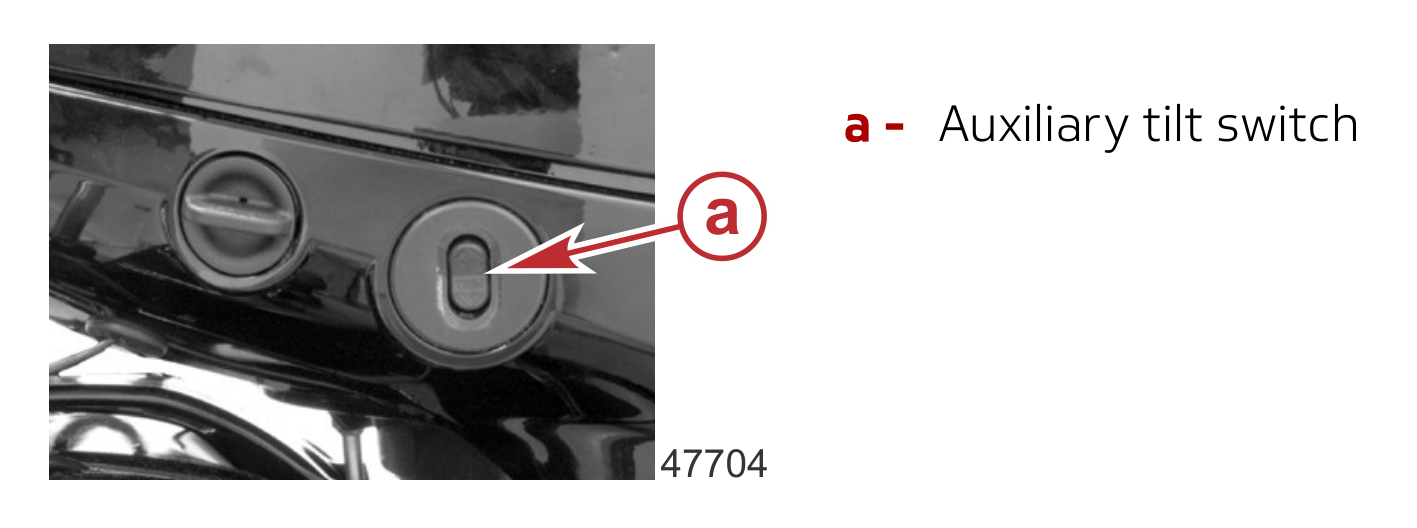
Figure 47704 from Mercury's V8 (200–300), V6 (150–225) CMS DTS Operation and Maintenance Manual (8M0230588, rev. 724, July 2024, printed p. 70 / PDF p. 80): identifies the external cowl-mounted auxiliary tilt switch (a) used to operate the power trim/tilt system. Tap to expand; confirm your own model's switch location in your serial-matched manual.
Tilt Support Lever and Knob (Example: 75/80/90/100/115/115 Pro XS, SeaPro FourStroke, 8M0145552)
When an outboard will not tilt down from a raised position, check visually whether the transom-bracket tilt support lever is engaged before pressing the switch repeatedly. Do not lean over the engine or try to force the lever free while it is carrying load.
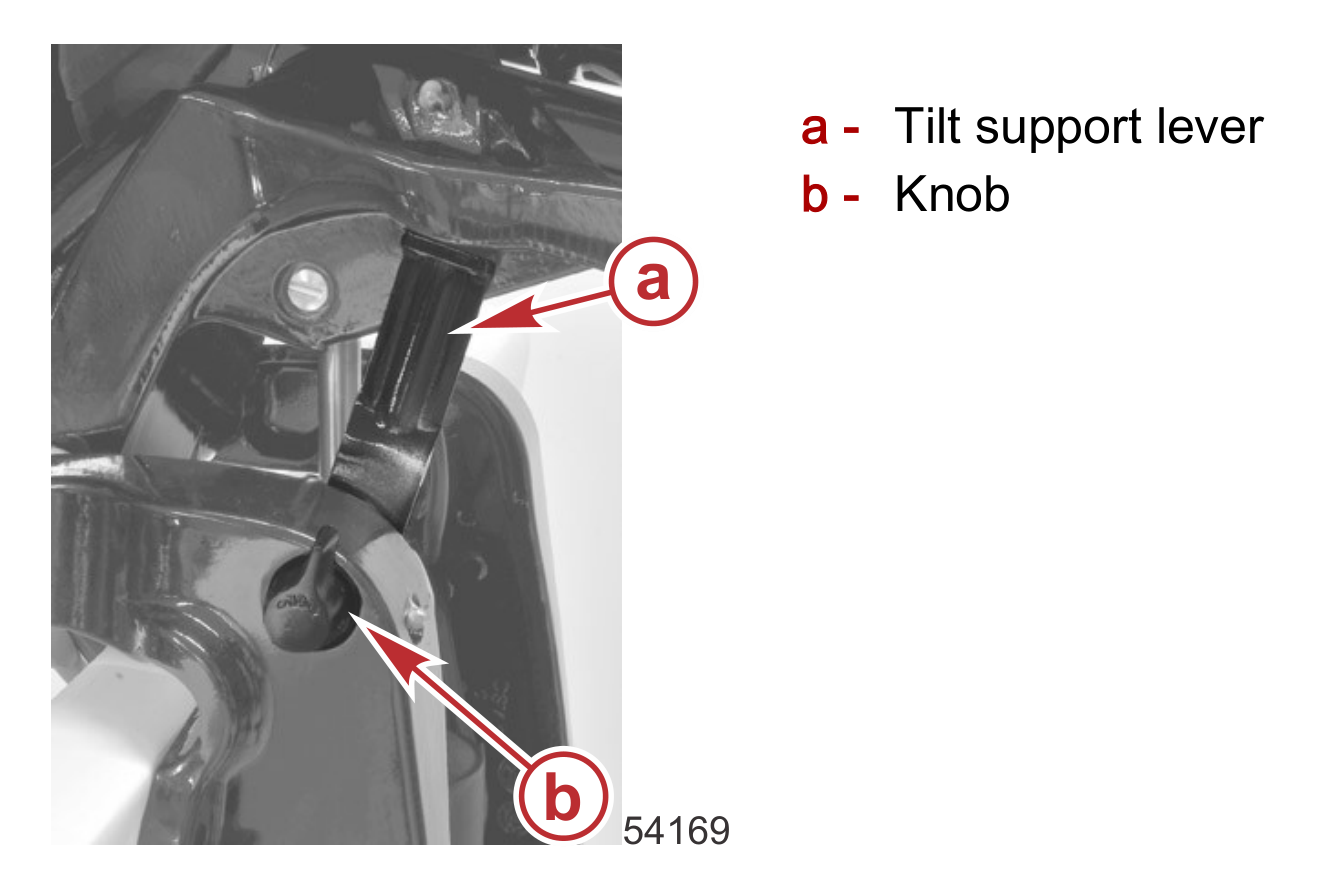
Figure 54169 from Mercury's 75/80/90/100/115/115 Pro XS, SeaPro FourStroke Operation, Maintenance and Installation Manual (8M0145552, rev. 417, © 2018, printed p. 35 / PDF p. 45): identifies the tilt support lever (a) and rotating knob (b) on the transom bracket. Tap to expand; hardware design varies by model, and this figure is for part identification only (not trailering support or manual valve release).
Record What You Observe (Without Guessing the Cause)
Write down the exact behaviour you see and hear for your service request rather than jumping to a parts diagnosis.
| What you observe |
What to note for service |
Safe next step |
| No sound at all |
Note whether it happens at one switch or both (if safe to check) |
Check visible battery switch state; stop repeated switch presses and log your observation |
| A click, with no motor hum |
Note whether you hear the click in up, down, or both directions |
Stop repeated clicking and record the direction(s) for service intake |
| Motor hums or spins, no movement |
Note that the trim motor runs while the outboard stays still, and in which direction(s) |
Release the switch right away and do not force or pry the outboard |
| Moves, then slowly drifts down |
Note how quickly it settles and whether it holds at any angle |
Do not tow with a drifting trim system; check your exact manual for parked support guidance |
| Visible wet spot, drip, or oily sheen |
Note where the wet spot appears without assuming the fluid source |
Stop operating the switch, keep any fluid out of the water, and take a photo from shore |
If you also have a no-crank or warning issue, check our Mercury outboard repair guide for the wider symptom chart.
Why Manual Release Lives in Your Exact Owner's Manual
Many Mercury outboards include a manual tilt release valve so the engine can be tilted by hand if the power trim/tilt switch can't move it. That feature is strictly model-specific: valve locations and procedures differ across Mercury families, and Mercury manuals warn that the valve must be tightened back down before operating the outboard so it doesn't tilt up in reverse.
Don't guess from a forum post or a different horsepower. Skip generic turn counts, random bolts, jacking, prying, or forcing the motor by hand. Pull the exact manual for your engine using the serial number label on the transom bracket:
If you have a trailer clearance question, read our outboard storage position vs. trailering support guide and follow your exact manual. Do not tow with a trim fault or rely on a drifting system for road clearance.
Common Mistakes
- Holding the switch when nothing moves. Repeatedly pressing or holding a stalled switch risks overheating wiring or draining the battery.
- Forcing, prying, or leaning over the outboard. Lifting against a stuck bracket or hydraulic lock can bend hardware or cause injury.
- Opening hydraulic fittings or adding random fluid. Mixing fluid specs or introducing dirt turns a simple inspection into a larger repair.
- Towing with a trim fault. Check your exact manual for parked vs. trailering support rather than relying on a failing system on the road.
When to Submit a Service Request
Stop dockside checks and submit a service request at hbwservice.ca if:
- The motor won't move from either switch
- You see a wet spot, oily sheen, damaged wiring, or smell anything burning
- The motor drifts down on its own
- You're unsure how your exact manual's release procedure applies to your serial number
Include:
- Your Mercury model and serial number
- What you observed (no sound, click, hum with no movement, drift, or wet spot)
- Whether both switches behaved the same way (if safely checked)
- Clear photos of the transom bracket and any wet spot taken from a secure position
Sources
- Mercury Marine, Operation, Maintenance and Installation Manual: 75/80/90/100/115/115 Pro XS, SeaPro FourStroke (Pub.
8M0145552, rev. 417, © 2018, printed pp. 33–36 / PDF pp. 43–46, fig. 54169: Power Trim and Tilt, Tilting Operation, Manual Tilting, Auxiliary Tilt Switch) (PDF)
- Mercury Marine, Operation and Maintenance Manual: V8 (200–300), V6 (150–225) CMS DTS (Pub.
8M0230588, rev. 724, July 2024, printed pp. 68–70 / PDF pp. 78–80, fig. 47704: Power Trim Operation, Tilting Operation, Manual Tilting, Auxiliary Tilt Switch)
- Mercury Marine Canada: Owner's Manuals Lookup
Ready to Get It Checked?
Submit what you observed, your engine serial number, and photos through hbwservice.ca, and our team will confirm next steps and scheduling.
Service request: hbwservice.ca
Phone: 905-342-2153
Address: 5369 Harris Boat Works Rd, Gores Landing, ON